

Deskripzioa
📦 Post/Page Import & Export makes it easy to migrate content between WordPress sites — no database dumps, no complex migration tools.
With a single click, export any post or page as a lightweight JSON file that includes everything: content, custom fields, taxonomies, featured images, and ACF data. Then upload that file on another WordPress site to instantly recreate the content.
Just click, download, upload, done.
✨ Key Features
- 📤 One-Click Export — Export any post or page as a JSON file directly from the list view
- 📥 Quick Import — Import JSON files via a simple popup modal
- 🖼️ Featured Image Transfer — Automatically downloads and re-attaches featured images on the destination site
- 🏷️ Taxonomy Preservation — Categories, tags, and custom taxonomies are fully preserved
- 📝 Custom Fields / PostMeta — All custom field data is carried over during migration
- 🔧 ACF Support — Advanced Custom Fields including nested repeaters up to 5 levels deep
- 🖼️ Inline Image Handling — Images embedded in post content are downloaded and URLs are updated automatically
- 📄 Custom Post Types — Works with any registered post type, not just posts and pages
- 🏗️ Page Builder Friendly — Compatible with Elementor, WPBakery, Beaver Builder, and more
- 🔒 Secure — Only administrators can export content
💡 Use Cases
- 🌐 Cross-Site Content Migration — Move posts or pages from a staging site to production without database migration
- 📋 Content Duplication — Clone a post or page within the same site with all its metadata intact
- 🏗️ Staging to Production — Build pages on staging and deploy to the live site via JSON export/import
- 🔄 Multi-Site Content Sharing — Share content across a multisite network or between independent installs
- 📦 Content Backup — Export critical posts as JSON backups before making major changes
- 👨💻 Developer Handoff — Share pre-built pages with clients or team members as portable JSON files
- 🛒 WooCommerce Product Migration — Move product pages with custom fields between stores
- 📰 Editorial Workflow — Export drafted content for offline review and re-import after approval
- 🎨 Template Distribution — Create a page with ACF fields and page builder layouts, distribute as JSON
- 🧪 A/B Testing — Duplicate pages quickly to test different content versions while preserving all metadata
- 🏫 Demo Content Setup — Set up demo content on fresh WordPress installations for training or presentations
- 🔀 Theme Migration — Export key pages and re-import them when switching themes to preserve structured content
📋 What Gets Exported
- ✅ Post title, content, and excerpt
- ✅ Post status and post type
- ✅ Featured image (auto-downloaded on import)
- ✅ All custom fields / postmeta
- ✅ Categories, tags, and custom taxonomies
- ✅ ACF fields (including nested repeaters and image fields)
- ✅ Inline images in content (auto-downloaded and URLs updated)
🤝 Works Great With These Popular Plugins
- 🔧 Advanced Custom Fields (ACF) — Full support for ACF fields including nested repeaters and image fields
- 🏗️ Elementor — All layout data stored in postmeta is preserved during export/import
- 🏗️ WPBakery Page Builder — Shortcode-based layouts in post content transfer seamlessly
- 🦫 Beaver Builder — Page builder data in custom fields is carried over
- 🛒 WooCommerce — Migrate product pages with all custom fields and taxonomies
- 📝 Yoast SEO — SEO metadata (title, description, focus keyword) is exported and imported
- 📝 Rank Math — All SEO metadata stored in custom fields is preserved
- 🖼️ Meta Box — Custom fields created with Meta Box are included in the export
- 🔁 WPML — Export translated content individually and import on multilingual sites
- 🗂️ Custom Post Type UI — Works with any custom post type registered by CPT UI
Pantaila-argazkiak



Instalazioa
📥 Install the Plugin
- Go to Plugins Add New in your WordPress dashboard
- Search for “Post Page Import Export”
- Click Install Now and then Activate
Or manually:
- Download the plugin ZIP file
- Upload the plugin folder to
/wp-content/plugins/ - Activate through Plugins Installed Plugins
📤 How to Export
- Go to Posts All Posts or Pages All Pages
- Hover over the post or page you want to export
- Click the “Export” link in the row actions (next to Edit, Trash, View)
- A JSON file will be downloaded to your computer — that’s it!
📥 How to Import
- Go to Posts All Posts or Pages All Pages
- Click the “Import” button next to “Add New” at the top
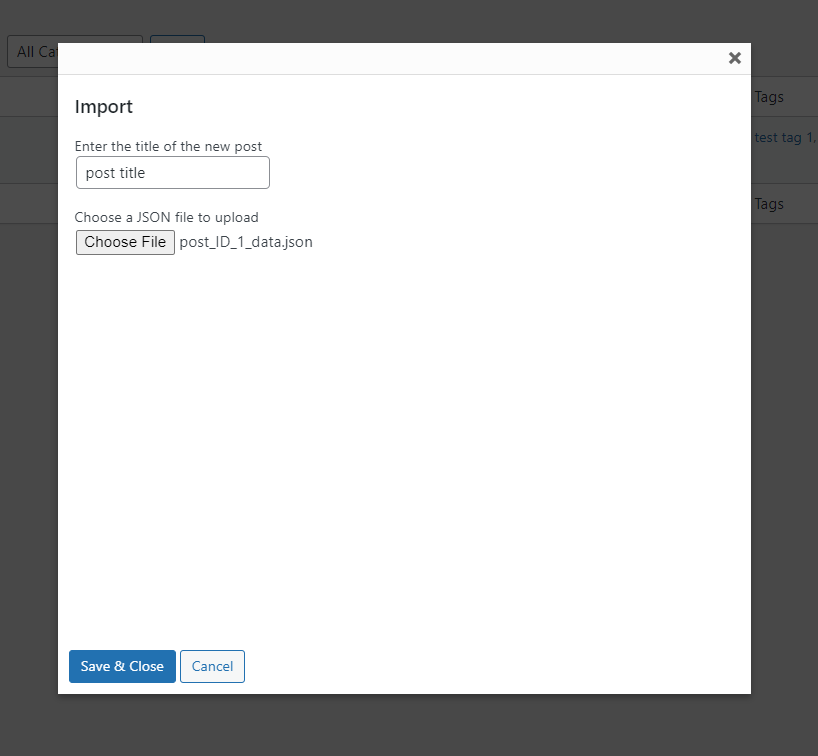
- In the popup modal, enter a title and choose your JSON file
- Click “Save & Close”
- Done! Your new post/page is created with all content, fields, taxonomies, and images
⚙️ Settings
This plugin works out of the box — no configuration needed. Once activated, Export and Import buttons appear automatically on your posts and pages list screens.
MEG
-
Does this work with custom post types?
-
Yes! The plugin works with any registered post type — posts, pages, WooCommerce products, portfolios, and any custom post type.
-
Will my featured image be transferred?
-
Yes. The featured image is automatically downloaded from the source site and re-uploaded to the destination site.
-
Do I need ACF installed on both sites?
-
If your content uses ACF fields, yes — ACF should be active on both the source and destination sites for full field support.
-
Can non-admin users export content?
-
No. Only administrators can export content for security reasons.
-
What file format is used?
-
Content is exported as a standard JSON file, which is lightweight and easy to transfer between sites.
-
Does it work with page builders?
-
Yes. Since page builders like Elementor, WPBakery, and Beaver Builder store their data in postmeta and post content, all of that data is preserved during export and import.
-
Can I import to a different post type?
-
The import creates a new post using the same post type as the original. The destination site needs to have the same post type registered.
Berrikuspenak


Laguntzaileak eta Garatzaileak
“Post/Page Import Export – Migrate Content with Custom Fields & Taxonomies” software librea da. Ondoko pertsonek egin dizkiote ekarpenak plugin honi.
Laguntzaileak
Garapena interesatzen zaizu?
Araka kodea, begiratu SVN biltegia edo harpidetu garapen erregistrora RSS bidez.
Aldaketen loga
2.1.0
- Updated compatibility with WordPress 6.9
- Improved plugin description and documentation
- Added support contact notice in import modal
- Updated plugin tags for better discoverability
2.0.5
- Fix export file format
2.0.4
- Security patch
2.0.3
- Security patch
2.0.2
- Security patch
2.0.1
- Security patch
2.0.0
- Enhance the way the plugin works
1.3.0
- Fix broken templates that have complex ACF Fields
- Test compatibility with WordPress 6.3.1
1.2.1
- Test with WordPress 6.2
1.2.0
- Showing import button when new page screen
- Fix import file path
1.1.0
- Fix enqueue of CSS & JS files
- Test with WordPress version 6.1.1
1.0.1
- Check compatible with WordPress 6.0.1
1.0.0
- First version of the plugin