

Deskripzioa
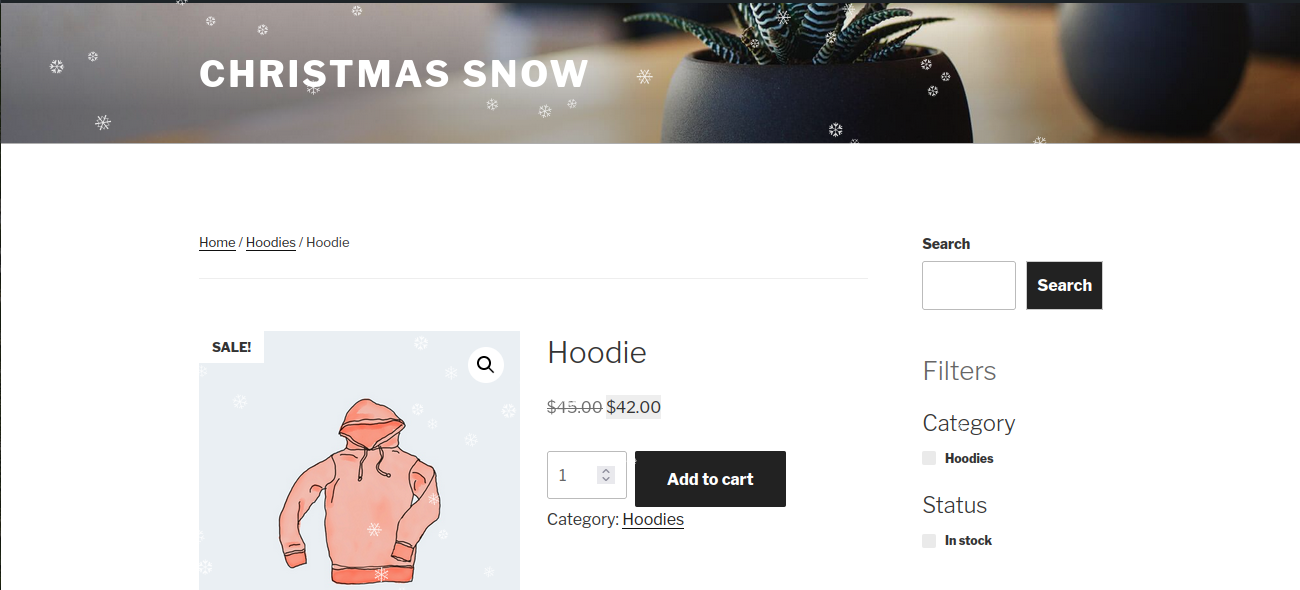
Christmas Snow adds an elegant falling snow effect to your WordPress site using a lightweight HTML5 Canvas engine. It still works the moment you activate it, and now you can shape every part of it from a friendly settings screen with a live preview.
Choose classic snowflakes, soft dots, festive emoji or your own image. Set how heavy the snow falls, which way the wind blows, where it appears and exactly which weeks of the year it should run. Everything you change is shown in a preview panel before you save.
Built for real sites
The effect is designed to stay out of the way of your content and your customers:
- Sprite based rendering keeps the frame cost flat even at high flake counts
- The animation pauses completely while the browser tab is in the background
- A separate, lower flake count is used on phones
- WooCommerce cart, checkout and account pages are excluded by default
- Visitors who ask their device to reduce motion never see the animation
- The canvas is marked as decorative so screen readers ignore it
Everything you can control
Appearance
- Flake type: characters and emoji, soft dots, or a custom image from your media library
- Any characters you like, so snowflakes, sparkles, stars or holiday emoji all work
- One colour or a mix of up to eight, blended randomly across the flakes
- Minimum and maximum flake size
- Minimum and maximum opacity
- Softness, for a dreamy out of focus look
- A depth effect that makes distant flakes smaller, slower and fainter
Motion
- Separate flake counts for desktop and mobile, plus the breakpoint between them
- Slowest and fastest fall speed
- Wind direction, gusts that swing the wind back and forth, and per flake sway
- Optional spin, with adjustable speed
- Cursor interaction: push flakes away, pull them in, or blow a gentle wind towards the pointer
- Settling snow that builds a drift along the bottom of the screen
Where it appears
- The entire site, the home page only, or a selection of content types and pages
- Always show on specific post or page IDs
- Never show on specific IDs
- Exclude WooCommerce cart, checkout and account pages
- Exclude search results and 404 pages
- Target desktop only or mobile only
- Show to everyone, only logged in users, or only logged out visitors
- Hide the effect from chosen user roles
Seasonal schedule
- Turn the snow on and off between two dates
- The range repeats every year, so you set it once
- Ranges that cross New Year work correctly, for example 1 December to 6 January
Presets
Six one click looks to start from: Gentle Drift, Classic Christmas, Heavy Blizzard, Golden Sparkle, Festive Emoji and Settling Snow. A preset fills in the appearance and motion settings and leaves your display rules and schedule untouched.
Tools
- Export your configuration as a JSON file
- Import a configuration onto another site
- Reset everything back to the defaults
- Copy the shortcode straight from the settings screen
Shortcode
Add [christmas_snow] to any page or post to force the snow on there, even where your display rules would normally hide it.
You can override a few settings for that page only:
[christmas_snow density="150" color="#ffd700" size="20" speed="1.5" wind="2"]
Supported attributes are density, color, characters, type, speed, wind, size and zindex.
For developers
Three filters are available:
cwg_ppl_snow_settingsfilters the resolved settings arraycwg_ppl_snow_should_displayfilters the final decision about showing the effectcwg_ppl_snow_configfilters the configuration passed to the JavaScript engine
Perfect for:
- Christmas and holiday campaigns
- WooCommerce stores
- Blogs and business websites
- Temporary seasonal decoration
More Plugins by ProPluginsLab
Free plugins
All available free on WordPress.org:
- Back In Stock Notifier for WooCommerce – Let customers subscribe to out of stock products and email them the moment stock returns.
- Recovero – Cart Recovery for WooCommerce – Recover abandoned carts automatically with reminder emails and win back lost revenue.
- Affireo – Affiliates for WooCommerce – Run your own affiliate program with referral tracking and commissions.
Pro plugins
Nine standalone premium WooCommerce plugins, each a one-time payment with lifetime updates:
- Vendero – Multivendor for WooCommerce – Turn your store into a complete multi vendor marketplace with vendor dashboards, commissions and payouts.
- Recovero – Cart Abandonment Recovery for WooCommerce – Advanced abandoned cart recovery with automated follow up campaigns and detailed reporting.
- Anticipo – Pre-Orders for WooCommerce – Sell products before they are released and take payment upfront or on release.
- Trackero – Advanced Shipment Tracking for WooCommerce – Complete fulfillment manager. Add tracking numbers to orders and keep customers informed in order emails.
- Kitero – Composite Products for WooCommerce – Let customers build their own kits, boxes and product combos, with a built in product bundle feature.
- Giftero – Gift Cards for WooCommerce – Sell digital gift cards with customizable templates, scheduled delivery and balance management.
- Plusero – Extra Fees for WooCommerce – Add conditional fees and surcharges based on cart total, shipping method, payment gateway, category, user role and more.
- Inputo – Name Your Price for WooCommerce – Let customers choose their price. Perfect for donations, tipping and pay what you want campaigns.
- Affireo – Affiliates for WooCommerce – Full affiliate marketing suite with multi tier commissions, payouts and performance reports.
You can browse and install all of these from the Plugins tab on the Christmas Snow settings screen. Visit ProPluginsLab for all our premium WooCommerce plugins and solutions.
Pantaila-argazkiak



Instalazioa
Minimum Requirements
- WordPress 5.0 or greater
- PHP 7.0 or greater
Automatic Installation
- Log in to your WordPress admin dashboard.
- Go to Plugins > Add New.
- Search for Christmas Snow.
- Click Install Now and then Activate.
- Visit Settings > Christmas Snow to shape the effect.
The snow starts working straight away with sensible defaults, so step 5 is optional.
Manual Installation
- Download the plugin ZIP file.
- Upload it to
/wp-content/plugins/. - Activate the plugin through the Plugins menu in WordPress.
MEG
-
Do I have to configure anything?
-
No. The plugin works the moment you activate it, exactly as it always has. The settings are there when you want them.
-
Where are the settings?
-
Under Settings > Christmas Snow, or by clicking Settings next to the plugin on the Plugins page.
-
Will this slow my site down?
-
The script is small, loads in the footer and defers. Rendering uses cached sprites rather than redrawing each flake from scratch, and the animation stops entirely when the tab is not visible. If you want to be extra careful, lower the flake count, lower the frame rate limit under Advanced, or switch the flake type to Soft dots.
-
Does it work on mobile?
-
Yes. Phones get their own, lower flake count, which you can adjust. You can also hide the effect on mobile entirely under Display Rules.
-
Does it respect accessibility settings?
-
Yes. If a visitor has enabled Reduced Motion on their device, the animation does not run at all. The canvas is also marked as decorative so assistive technology ignores it. You can turn this behaviour off, though leaving it on is strongly recommended.
-
Can I use it with WooCommerce?
-
Yes. Cart, checkout and account pages are excluded by default so nothing decorative sits between a customer and the pay button. You can change that under Display Rules if you want to.
-
Can I show snow on only one page?
-
Yes, in two ways. Either set Show on to “Selected content types and pages” and list the page ID, or turn on “Only load where the shortcode is used” under Advanced and drop
[christmas_snow]onto that page. -
Can I use emoji or my own image instead of snowflakes?
-
Yes. Set the flake type to “Characters and emoji” and type any characters you like, separated by spaces. Or set it to “Custom image” and pick a small transparent PNG or SVG from your media library.
-
The snow covers my sticky header or a popup. How do I fix it?
-
Lower the Layer (z-index) value under General until the snow sits behind that element.
-
How do I make the snow appear only in December?
-
Open the Schedule tab, turn on “Only show during a date range” and set your start and end dates. The range repeats every year, and ranges that cross New Year are handled correctly.
-
How do I check what a page looks like without snow?
-
If you are an administrator, use the snowflake item in the toolbar. It shows whether the snow is running on that page and lets you preview it with or without the effect.
-
How do I turn the effect off?
-
Switch off “Enable snowfall” under General. Deactivating the plugin also works and keeps your settings for next year.
-
Will I lose my settings when I update or deactivate?
-
No. Settings are kept on deactivation and across updates. They are only removed if you delete the plugin.
Berrikuspenak
Ez dago berrikuspenik plugin honentzat.
Laguntzaileak eta Garatzaileak
“Christmas Snow – Festive Snowfall Effect” software librea da. Ondoko pertsonek egin dizkiote ekarpenak plugin honi.
Laguntzaileak


Itzul zaitez Christmas Snow – Festive Snowfall Effect zure hizkuntzara.
Garapena interesatzen zaizu?
Araka kodea, begiratu SVN biltegia edo harpidetu garapen erregistrora RSS bidez.
Aldaketen loga
2.0.0 2026-08-20
This is a large release. Everything that used to be fixed is now yours to control, and the effect itself has been rewritten.
New: settings screen
- Added a full settings screen at Settings > Christmas Snow
- Added a live preview that updates as you change any setting, with three preview backgrounds
- Added six one click presets: Gentle Drift, Classic Christmas, Heavy Blizzard, Golden Sparkle, Festive Emoji and Settling Snow
- Added a status indicator showing whether the snow is currently live, off, waiting for its season or shortcode only
- Added a Settings link on the Plugins page
- Added an administrator toolbar item showing the status on the current page, with a preview toggle
- Fields that do not apply to your current choices are now hidden automatically
New: appearance options
- Added flake types: characters and emoji, soft dots, and a custom image from the media library
- Added custom flake characters, with full emoji support
- Added multi colour flakes, up to eight colours mixed at random
- Added minimum and maximum flake size
- Added minimum and maximum opacity
- Added a softness control
- Added a depth effect that scales size, speed and opacity together
New: motion options
- Added separate desktop and mobile flake counts, plus a configurable breakpoint
- Added minimum and maximum fall speed
- Added wind direction, gusts and per flake sway
- Added optional spin with adjustable speed
- Added cursor interaction with four modes and an adjustable strength
- Added settling snow that builds a drift along the bottom of the screen
New: display rules
- Added display modes: entire site, home page only, or selected content types and pages
- Added always show and never show lists by post or page ID
- Added toggles for WooCommerce pages, search results and 404 pages
- Added desktop only and mobile only targeting
- Added logged in and logged out targeting
- Added the ability to hide the effect from chosen user roles
New: scheduling
- Added an annual seasonal schedule with a start and end date
- Ranges that cross New Year are handled correctly
New: Plugins tab
- Added a Plugins tab listing every free plugin, pro plugin and add-on from ProPluginsLab
- Filter the catalogue by free, pro or add-on
- Free plugins install in one click, using WordPress’ own installer
- Plugins already on your site are marked as installed or active
- Shows the current ProPluginsLab coupon when one is running, with click to copy
- The catalogue and the offer refresh once a day in the background and can be refreshed by hand
- A built in catalogue means the tab still works if the site cannot reach the internet
New: control and tools
- Added the
[christmas_snow]shortcode with per page overrides - Added a shortcode only mode
- Added settings export and import as JSON
- Added a reset to defaults tool
- Added a frame rate limit
- Added a layer (z-index) control
- Added the option to confine the effect to a CSS container
- Added the
cwg_ppl_snow_settings,cwg_ppl_snow_should_displayandcwg_ppl_snow_configfilters
Improved: the snowfall engine
- Rewritten from scratch as a configurable engine
- Flakes are now rendered from cached sprites instead of drawing text every frame, which keeps performance steady at high flake counts
- Canvas now renders at device pixel ratio, so flakes are crisp on high resolution screens
- Motion is now time based, so the fall speed is identical on a 60Hz and a 144Hz display
- The animation now pauses completely while the tab is in the background
- Added a frame rate limit to save battery
- Resize handling is now debounced and handles orientation changes
- The canvas is now marked as decorative for assistive technology
- Every configuration value is validated in the browser as well as on the server, so a bad value can never break the animation
- Sprite memory is now capped
Improved: everything else
- Settings are validated and clamped on save, and unknown values are discarded
- Translations are now properly supported, with a text domain and a languages folder
- Settings are now removed cleanly when the plugin is deleted, including on multisite
- Tested with WordPress 7.1
1.0.1 2026-06-10
- Tested with WordPress 7.0
- Tested with WooCommerce 10.8.0
1.0.0 2025-12-25
- Initial release
- Added festive Christmas snow animation
- No-configuration, plug-and-play design
- Accessibility-friendly (respects reduced motion)