
Deskripzioa
Static Porter is a high-performance static site generator designed for speed and simplicity.
It crawls your website and converts your database-driven pages into flat HTML files, allowing your server to bypass PHP and MySQL entirely for lightning-fast load times.
Unlike traditional caching plugins, Static Porter generates a physical directory of your site.
When a visitor arrives, your server serves the pre-built HTML file instantly.
Automated Maintenance (Smart Refresh)
Never worry about stale content. Static Porter watches your ‘Publish’ button. When you post, we instantly regenerate just that post and your homepage—keeping your site fast and fresh without you lifting a finger.
Key Features:
- One-Click Full Crawl: Easily generate a static version of your entire site.
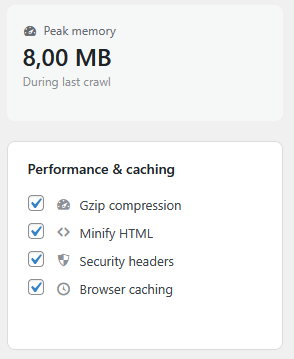
- Server-Safe Crawling: Includes a real-time “Peak Memory” monitor and an emergency “Stop Crawl” button. Designed for budget shared hosting where resources are limited.
- Persistent Cache Table: Monitor exactly which files are cached with individual ‘Delete’ and ‘Recrawl’ controls.
- Advanced Optimization: Built-in HTML Minification and Gzip compression support.
- Security & Caching: Automatically configures .htaccess with security headers and browser caching rules.
- File Storage Location: See exactly where your static HTML files live, with the full server path, a direct browser-accessible URL, a writable/not-writable status check, and a one-click “Copy path” button.
- Download as ZIP: Export your entire static site as a single ZIP file with one click — perfect for browsing locally, migrating to a different host, or keeping a snapshot of your site.
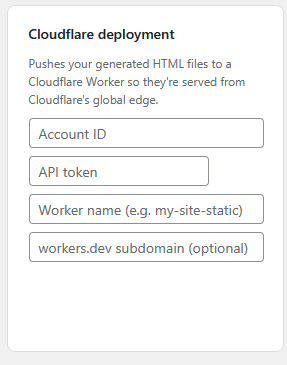
- Cloudflare Deployment: Push your generated static files straight to a Cloudflare Worker, serving your site from Cloudflare’s global edge network for maximum speed.
Pantaila-argazkiak


Instalazioa
- Upload the
static-porterfolder to the/wp-content/plugins/directory. - Activate the plugin through the ‘Plugins’ menu in WordPress.
- Go to the ‘Static Porter’ menu in your sidebar.
- Configure your excluded paths and click ‘Start Full Crawl’.
MEG
-
Will Static Porter really make my site faster?
-
Yes!
Traditional WordPress pages require the server to process PHP and query a MySQL database every time a visitor arrives.
Static Porter converts these into flat HTML files. Your server can then deliver these files instantly, bypassing the “heavy lifting” entirely.
This often results in a nearly instant Time to First Byte (TTFB). -
Will my URL structure or permalinks change?
-
No. This is one of the core strengths of Static Porter.
The plugin generates a static mirror of your site that follows your existing WordPress permalink structure perfectly.
Your visitors (and search engine bots) will continue to see the same clean URLs they always have, but the pages will simply load much faster. -
Do I have to manually recrawl my site every time I write a post?
-
No. Static Porter includes a “Smart Refresh” feature. When you publish or update a post, the plugin automatically regenerates the static version of that specific post and your homepage.
It’s a “set-and-forget” solution for active bloggers. -
Can I use this on a low-resource budget server?
-
Absolutely.
Static Porter is designed to be resource-efficient and includes a built-in “Peak Memory” monitor in the dashboard so you can track its impact.
If the crawl is too heavy for your server, you can use the “Stop Crawl” safety button at any time to immediately halt the process. -
Does this plugin improve my site’s security?
-
Yes.
In addition to serving static files (which are inherently more secure than dynamic PHP), Static Porter automatically injects security headers into your .htaccess file.
This includes protection against clickjacking (X-Frame-Options) and MIME-type sniffing (X-Content-Type-Options). -
Will this help my Google search rankings (SEO)?
-
Speed is a major ranking factor for Google, especially with Core Web Vitals.
By serving ultra-fast static HTML and enabling Gzip compression and browser caching automatically, your site will likely see improved performance scores, which can lead to better visibility in search results. -
What happens if I want to remove a single page from the cache?
-
Unlike simple “purge all” plugins, Static Porter gives you a persistent cache table.
You can view a list of every cached URL and use individual “Delete” or “Recrawl” buttons for precise control without affecting the rest of your static site. -
Can I choose which parts of my site to make static?
-
Yes.
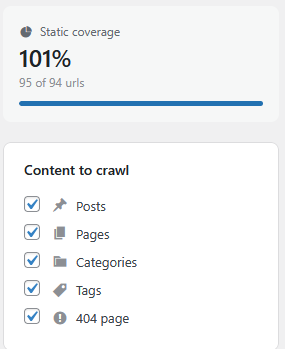
The dashboard allows you to toggle the crawling of Posts, Pages, Categories, and Tags independently.
You can also use the “Excluded Paths” box to prevent specific directories from ever being turned into static files. -
How do I know if it’s working?
-
Enable the “HTML Attribution” setting.
View your website’s source code, and you will see a comment at the top confirming the page is being served as static HTML. -
Does this work with WooCommerce?
-
It is recommended to exclude checkout, cart, and account pages using the “Excluded Paths” setting to ensure dynamic functionality remains intact.
Berrikuspenak

Laguntzaileak eta Garatzaileak
“Static Porter” software librea da. Ondoko pertsonek egin dizkiote ekarpenak plugin honi.
Laguntzaileak
Itzul zaitez Static Porter zure hizkuntzara.
Garapena interesatzen zaizu?
Araka kodea, begiratu SVN biltegia edo harpidetu garapen erregistrora RSS bidez.
Aldaketen loga
4.0.0
- New: Added a “File storage location” settings card showing the full server path and browser-accessible URL of the static file cache, a writable/not-writable status indicator, a one-click “Copy path” button, and a direct “Open in browser” link.
- New: Added a “Download ZIP” button that packages your entire static HTML output into a single ZIP file and triggers an automatic browser download. Useful for local site browsing, migrating to a different host, or sharing a snapshot of the static output. Requires PHP’s ZipArchive extension (available on all major hosts).
3.5.9
- New: Added a “Deploy to Cloudflare” option that uploads your generated static HTML files to a Cloudflare Worker, so they can be served entirely from Cloudflare’s global edge network. Configure your account ID, API token, and worker name in the new “Cloudflare deployment” settings card.
- Layout: Moved Start full crawl and Stop crawl next to Purge cache in the main action row, instead of the page header.
- Security: The Cloudflare API token field no longer echoes the saved token back into the page source; leave it blank to keep the existing value.
3.5.8
- Redesign: Rebuilt the dashboard with a clearer status header, grouped settings cards (Content to crawl, Excluded paths, Performance & caching, HTML attribution), and icon-labeled toggles in place of the old stacked gray boxes.
- No more page reloads: Replaced the post-crawl countdown/reload with a “Refresh stats” action that updates the coverage, requests-avoided, memory, and disk-size figures in place via AJAX, with no full page reload at all.
- Cached pages table: Added a live search box to filter cached URLs, and fixed a bug where the “Start full crawl” button could stay stuck on “Crawling…” after a natural completion.
3.5.7
- Bug Fix: Fixed an infinite reload loop on the dashboard after a crawl completed. The post-crawl countdown timer was never stopped, so once it reached zero it kept counting into negative numbers and repeatedly tried to reload the page, leaving the browser stuck refreshing with no way to stop it short of closing the tab. The countdown now stops itself after triggering a single, clean reload.
3.5.6
- UX Improvement: Dashboard now clearly indicates active/inactive status with a “reassurance” message for new users.
- Workflow: Removed automatic page reload after crawling to allow reading of statistics.
- Privacy: HTML attribution comment is now opt-in by default.
3.5.5
- HTML Attribution Fix: Correctly outputs the verification message as an HTML comment on the first line of static pages.
3.5.4
- New Icon: Updated plugin branding to a professional “Porter/Package” box icon.
- UI Refresh: Restored sidebar labels and updated dashboard header icons.
- Timer Update: Reduced post-crawl auto-refresh from 10 seconds to 5 seconds for a faster workflow.
3.4.7
- Major fixes
- Added Stop Crawl functionality.
- Added individual row Delete and Recrawl buttons.
- Added 10-second auto-refresh after crawl.