
Deskripzioa
Worksuite WP, a comprehensive put all your business operations into one database. This makes things faster. It helps teams work together. It helps make data-based decisions. And, it makes it easier to grow your business.
Worksuite WP has lots of features to meet different business needs. These include managing leads, financial reports, project management, and more.
It’s easy to start using Worksuite WP within WordPress. With one click, you can start using this powerful plugin. It sets up a WorkSuite account for you automatically, saving you time.
Worksuite WP is good for all types of businesses, big or small. You may be working alone, leading a team, or running a business. Worksuite WP can help you manage your work. It can make your workflow smoother and boost your efficiency.
What You Can Do with Worksuite WP
In the business world, adaptability and scalability are crucial for success. The versatile WordPress plugin, WorkSuite WP, tailors to meet businesses’ diverse needs. It caters to startups and established enterprises alike. This plugin adapts to fit your organization. It streamlines operations and promotes growth.
WorkSuite WP – ERP: Tailored for Diverse Business Needs
WorkSuite WP is a comprehensive and highly customizable Enterprise Resource Planning (ERP) solution designed to cater to the unique requirements of businesses across various industries. With its modular architecture and scalable platform, WorkSuite WP empowers organizations to streamline their operations, enhance productivity, and gain a competitive edge in today’s dynamic business landscape.
-
Solopreneurs and Freelancers – Helps to manage tasks, automate activities, and track client interactions. With this tool, you can save time, improve skills, and grow your business
-
Small to Medium Businesses – Acts as a central hub for project management, CRM, HR, Finance and more. It streamlines operations for a smoother business flow.
-
For Large Corporations and Enterprises – Fosters communication and breaks down barriers. It ensures a united and productive workforce, no matter the location.
-
Product and Service-Based Companies – Caters to inventory, production, client management, and service delivery. This comprehensive tool adapts to diverse industry requirements.
Limitless Possibilities for Growth and Success
WorkSuite WP isn’t a tool collection. It’s a flexible platform that grows with your business. It helps you reach new levels of efficiency, productivity, and success.
Whether you’re launching a new project or improving operations, WorkSuite WP is perfect. It revolutionizes your business, unlocking its full capabilities.
Try out this versatile WordPress tool. It makes tasks simpler. It promotes teamwork and ensures lasting progress for your company. This is true no matter how big or small it is or what stage it’s in.
Why should you use WorkSuite WP ?
No matter what your business is, if you need flexibility, WorkSuite WP is the right choices for you. It offers features to manage your business effortlessly.
WorkSuite WP not only offers a bundle of powerful plugins. They help you operate and manage businesses. It’s the ultimate tool to collaborate with your team where you can get better client results with ease.
WorkSuite WP CRM – For Lead, Follow UP Client, and Proposal
A CRM system is essential for managing customers, leads, and clients. When it comes to your WordPress website, getting a CRM system is crucial. Whether you’re a small business or a large enterprise, this CRM adapts to you. This flexible module allow you to:
- Contact database to store all interactions.
- Multi-channel lead capture & scoring.
- Sales pipeline monitoring.
- Proposal and quotation builder.
- Helpdesk ticketing & SLAs.
- Contracts, renewals & lifecycle management.
Manage client info, activities, invoices, contracts with WorkSuite WP. Effective lead management involves identifying, nurturing, and converting potential customers. Understand customer needs, resolve issues, and ensure satisfaction for client management. It’s crucial for retaining customers, growing revenue, and enhancing reputation.
WorkSuite WP – Project Management
Within WorkSuite WP, we enhance collaboration to boost productivity. You can create projects, milestones, and tasks. Monitoring your business performance is crucial for achieving goals. Analyzing indicators helps identify strengths, weaknesses, and progress. With WorkSuite WP Project Management track project progress in real-time. Identify bottlenecks and improve workflow efficiency for better results.
For teams aiming to elevate their project management practices, leveraging Cloodo’s insights on effective project management, including task management strategies to enhance your workflow and drive project success with milestone tracking, can significantly contribute to achieving more streamlined operations and successful project outcomes.
Monitoring Your Business Performance
Monitoring business performance is crucial for achieving goals. Analyzing indicators helps identify strengths, weaknesses, and progress. With WorkSuite WP Project Management track project progress in real-time. Identify bottlenecks and improve workflow efficiency for better results.
A comprehensive company performance overview allows you to make more data-driven decisions.
-
Manage company projects, your client support in a single system.
-
Keep track of all your projects in a simple way.
-
Assign tasks to project members and track their status.
-
Empowered teams, satisfied clients, and increased profitability.
Customizable Field for Operations
Customizable Field for Operations lets you create and change dashboard fields. Fields track various operation aspects like status, priority, cost, etc. You can customize field names, types, formats, and validation rules. Add or remove fields from your dashboard anytime.
WorkSuite WP ’s project module has customizable fields for tracking project details. Track project budget, timeline, and resources with custom fields.
-
Using Task Kanban board and filtering project tasks with different criteria.
-
Create various custom fields for your project to suit your team/company operation.
WorkSuite WP – TeamWork
WorkSuite WP HRM makes HR tasks easy in WordPress. You can make employee profiles easily. Add personal info, documents, reviews in one place. The plugin is flexible. Customize evaluations, track goals, manage leaves, and more. It offers self-service for staff too. It boosts efficiency by combining HR tasks. It’s a fantastic tool for meeting evolving business needs.
Strengthen Team Collaboration
WorkSuite WP plugin offers a solution for team management and file sharing. It enhances collaboration, breaks barriers, and ensures alignment.
For any organization to succeed, team collaboration is crucial. It enables effective teamwork, idea sharing, problem-solving, and support. When collaboration is key, teams combine skills, perspectives, and experiences for innovation.
You can store and share unlimited project documentation, files, and comments. Add members to projects for progress updates. Set project milestones with deadlines and costs.
WorkSuite WP HRM simplifies managing human resources in WordPress. It offers various features to enhance HR efficiency:
-
Customize employee profiles with personal and professional details.
-
Track attendance, leaves, and working hours.
-
Track and approve expenses with receipts.
-
Automate payroll calculations and generate pay slips.
-
Assign tasks, communicate, and check progress.
-
Integrate with WordPress and popular plugins.
-
Enhance HR processes for businesses of all sizes.
Analyze Your Workflow and Enhance Collaborations
WorkSuite WP ’s HRM module helps streamline HR processes. It reduces paperwork and boosts employee engagement. One standout feature is workflow analysis for better collaborations. Manage employee data, attendance, leave, and performance. Everything in one place for easy tracking and improvements.
Employees can access info, request time off, and manage benefits online. Managers can track performance, identify needs, and reward top performers. Encouraging growth and improvement within the organization.
Powerful HR Admin Dashboard
The HRM module includes a robust HR Admin dashboard. It offers real-time access to crucial HR metrics. You can track employee attendance, leave requests, and performance data.
For leave management, each employee has a personal account. They can update personal information, work experience, education, skills, and languages. You can also access organization information added by the Admin.
Employees can check current, outstanding, and completed tasks. They can also apply for leaves. The dashboard streamlines attendance and time management tasks.
With this tool, HR managers can check tasks. They can spot areas for improvement. The HR Admin dashboard facilitates employee onboarding and job description customization. It also helps track employee certifications and training needs.
Built-in Management System
WorkSuite WP ’s HRM module makes HR tasks easier by automating processes. It handles employee data entry and performance tracking. The module provides various leave types, workday specifications, and holiday lists. It simplifies employee leave management with unique profiles for each employee. The portal lets employees access information. They can also request time off and manage benefits online. HR managers can focus on strategic tasks like talent management and employee engagement.
WorkSuite WP – Ticketing Management
WorkSuite WP is a WordPress plugin for managing your online workplace. It helps you talk to team members, clients, and freelancers. You can talk to them right from your WordPress dashboard. Assign tasks, track progress, share files, and generate reports.
Manage support tickets with the communication module. Track inquiries, resolve issues, and boost customer satisfaction. The helpdesk ticketing system ensures timely responses to customer inquiries.
For businesses seeking to unlock the full potential of their support and communication modules, Cloodo’s comprehensive guide on leveraging Work Suite to enhance business support systems offers advanced strategies and tools to foster better customer relationships and team collaboration.
What Do You Get in The Free vs. Pro Plan?
At WorkSuite WP, we get it – every business is different. With unique challenges, goals, and growth paths. That’s why we’ve made pricing plans super flexible. They suit all types of organizations, big or small. So, you can get the tools you need to succeed.
Free Plan for Starting Out
For solopreneurs, startups, and small teams starting out, we’ve got you covered. Our complimentary free plan offers a variety of useful features. CRM, Project Management, HR tools – all free. It’s there to help you succeed without costs.
Upgraded Pro Plan for Growing Businesses
As your business expands, so does WorkSuite WP. Our Premium plan is perfect for bigger teams with more than 5 members. Just $49 monthly and within this plan, you get:
-
Priority support from our expert team for quick help.
-
Customization options to match your unique needs.
-
Scalability features for future growth without hassle.
Making Success Affordable
At WorkSuite WP, we believe success shouldn’t be pricey. We design our plans for accessibility and flexibility. They fit your needs, enabling you to maximize our solution without overspending.
Whether you’re starting or growing, WorkSuite WP offers great value. We align our pricing with your growth goals. Try our all-in-one solution and see the difference it makes, no matter your budget.
About Cloodo
Cloodo is a multifaceted workspace platform engineered to enhance collaboration and project management in businesses. It provides tools that aid in the administration of both in-house and outsourced resources, optimizes workflows, and boosts productivity.
Cloodo Workspace serves as a unified platform where individuals can arrange and oversee their tasks using project management strategies. In addition, Cloodo extends services like SEO, web design, graphic design, and web customization.
WorkSuite WP plugin, supported by Cloodo, offers a universal Workspace platform. It connects outsourcing and internal company resources for a hybrid business approach.
Workchat – Website LiveChat & WhatsApp, Telegram Chat, Line Messenger, WeChat, Email, SMS, Call Button provide supports workforce connectivity and management. This platform enhances communication and productivity. WorkChat is suitable for freelancers, teams, agencies, and corporations.
View more of Cloodo Resources:
Installation
- First make sure you’ve got WordPress installed.
- Install your plugin as below (you may already know how!)
- Activate the plugin through the ‘Plugins’ screen in WordPress
- If it is the first time you load the plugin, we will automatically create a WorkSuite Account based on the email that you use to register for WordPress.
AUTOMATIC INSTALL FROM WORDPRESS DASHBOARD
- Login to your WordPress Website admin panel
- Navigate to Plugins -> Add New
- Search WP WorkSuite – ERP, Workplace, CRM, HRM, Project Manager & Company Board
- Click Install and Activate
MANUAL INSTALL FROM WORDPRESS DASHBOARD
- Download the plugin by clicking on the blue ‘Download’ button above. A ZIP file will be downloaded.
- Login to your site’s admin panel and navigate to Plugins -> Add New -> Upload.
- Click choose file, select the plugin file and click Install
- Activate the plugin
For more detail instruction, go to the install WorkSuite on WordPress page.
Pantaila-argazkiak
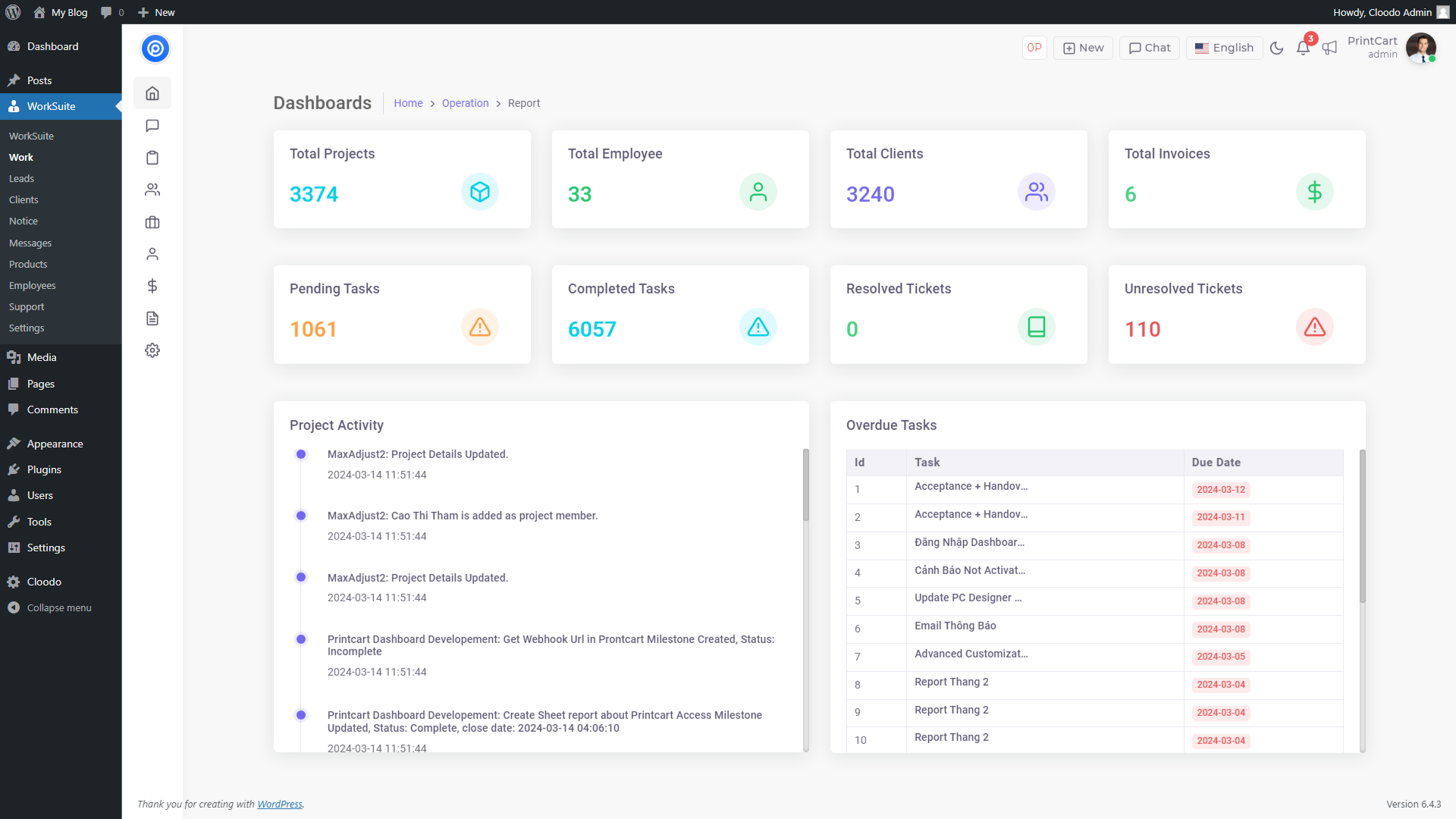
Dashboard 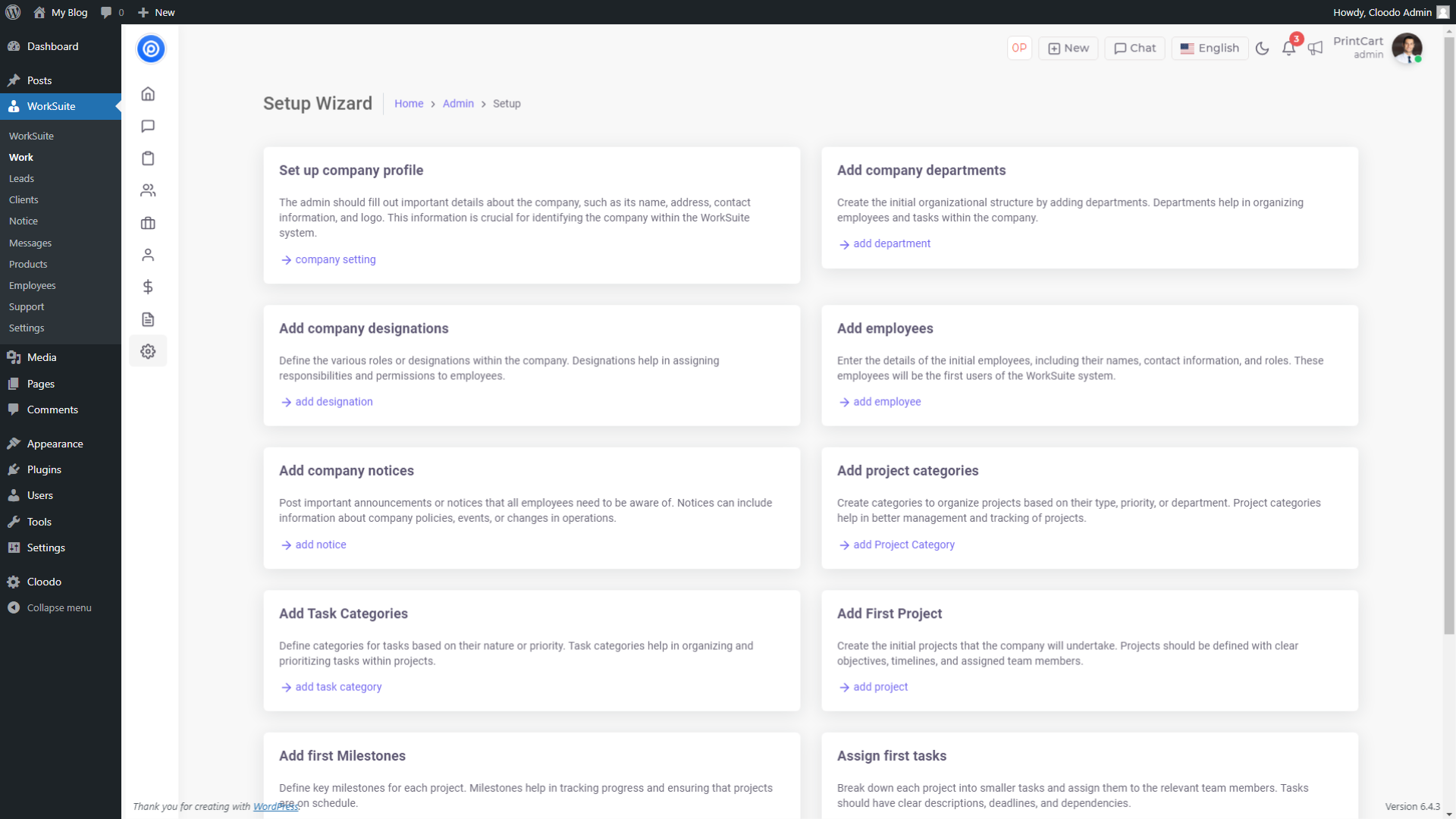
Set-up Wizard 
Project Reports 
Project Details 
List Leads 
Leads Reports 
Clients Details 
Clients Reports 
Clients Ticket 
Chat Messages 
Product Management
MEG
-
Why we build this WordPress ERP plugin for your business?
-
WordPress is a popular content management system that is highly-specialized for creating public-facing websites. Most of start-up start with WordPress to manage their publicity but soon they need a better system to manage their operation
Companies often need a private setup, also known as an intranet. That is where Cloodo Worksuite Workpress plugin comes in to provide a Workspace for any Workpress website and team
There are plenty of free plugins available to add privacy and other requirements – but you’ll need to cherry-pick the functionality you need, and make sure they all work well together.
WP Worksuite gives you everything you need in one WordPress plugin to lock down your site and start building your company’s intranet. Cloodo Worksuite are basically private, internal, websites for businesses. However, they can also be found an internal communications platform, collaboration tools, knowledge sharing platform, and even a social network. Each of which are items possible to do with a WordPress site.
-
Do I have to pay for Cloodo Worksuite to use this plugin?
-
Cloodo Worksuite is free for any agency under 5 team member and you can use the Workplace for your WordPress as well as other features for free life-time. You will need to upgrade to premium account if your organization member is over 5 team member while the Worksuite is really helpfull for your business.
-
Do I have to create an account on Cloodo to use this plugin?
-
When you install this WordPress Workplace plugin, the plugin itsefl will help to create an Worksuite Account for your WordPress admin smealessly and you just need to begin to work with your business.
-
Can I set up Custom field on WordPress admin to match with Worksuite field?
-
Yes, Worksuite have advanced setting of Custom Field and you can set up unlimited Custom Field in your CRM system to matching with data lead from and sysn with WordPress. Please contact us to get instruction or request any custom development or API intergration at support@cloodo.com
We also provide any custom development and BI report
-
Will this plugin work WooCommerce or other WordPress plugin?
-
Each worksuite has their own company API so we can intergrate with any other API data, system or WordPress plugin. Although is it quite easy for developer but it takes times so we just made some basic integration with WooCommerce, CR7…We are open for custome development and integration request to integrate your Worksuite with any other Wp Plugin. Send us your request at support@cloodo.com
-
Does it need any configuration?
-
No, it is a plug ‘n’ play plugin. Just install the plugin, and it will start capturing and displaying reports from supported form plugins. You can visit the settings page to see some basic config options.
-
Can I export contact to CSV or download our Contact?
-
Yes you can do it with many other filter and other lead categorized management. We are updating more and more feature on data management for user.
-
Is API required to run this plugin?
-
Yes. Plugin will register an account automatic after you click register button on first screen on erp.cloodo.com. All your data will be saved here.
-
What third-party resources does the plugin use?
-
THE PLUGIN USES THE FOLLOWING THIRD-PARTY RESOURCES
Bootstrap
License: MIT
Source: https://getbootstrap.com/
Berrikuspenak


Laguntzaileak eta Garatzaileak
“Worksuite WP – ERP, Workplace, CRM, HRM, Project Manager & Company Board” software librea da. Ondoko pertsonek egin dizkiote ekarpenak plugin honi.
Laguntzaileak
Garapena interesatzen zaizu?
Araka kodea, begiratu SVN biltegia edo harpidetu garapen erregistrora RSS bidez.
Aldaketen loga
2.2.4 (March 13, 2024)
- Fix iframe can’t load for new user
2.2.3 (March 11, 2024)
- Fix dashboard link
- Update iframe loading
- Update settings interface
- Update CSS for settings interface
- Fix warning
2.2.2
- Fix error on new API version
2.2.1
- Security fix
2.2.0
- Sync WordPress User to Employees
- Update core app login via email
2.1.1
- Fix error register account
2.1.0
- Add new feature: Products Management
- Sync Woocommerce Customers to Clients
2.0.0
- Update New UI
- Add new feature Projects, Leads, Notice Board, Messages
1.1.0
- Add Client feature
1.0.0
- Init