WordPress.org

Euskara

  • Itxurak
  • Pluginak
  • Albisteak
  • Laguntza
  • Honi buruz
  • Parte hartu
  • Taldea
  • Lortu WordPress
Lortu WordPress
WordPress.org

Plugin Directory

Where Did You Hear About Us Checkout Field for WooCommerce

  • Submit a plugin
  • My favorites
  • Log in
  • Submit a plugin
  • My favorites
  • Log in

Where Did You Hear About Us Checkout Field for WooCommerce

wooassist-(r)en eskutik
Deskargatu
  • Xehetasunak
  • Berrikuspenak
  • Instalazioa
  • Garapena
Laguntza

Deskripzioa

This plugin adds a custom field in the checkout page to ask your customers where they heard about your store.

This plugin also offers an “Other” field where your customer can provide a specific answer in a separate textbox.

Features:

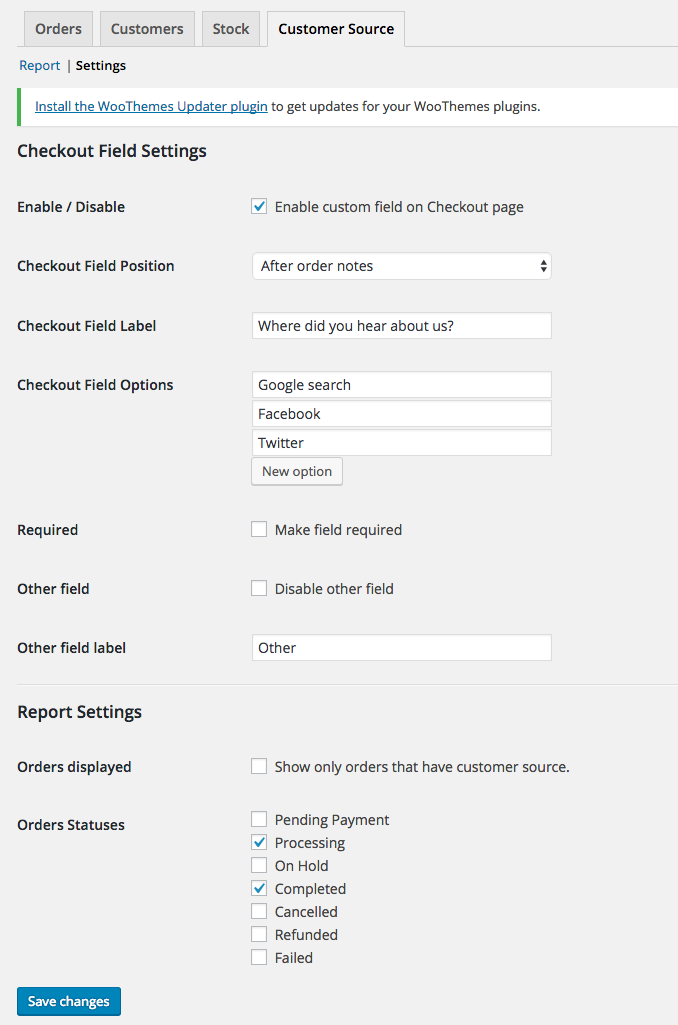
  • Easily change the labels and choices for the custom field in the checkout page.
  • View reports on the “Reports” section in WooCommerce.
  • Enable/disable the custom field to be required on checkout.
  • Enable/disable the “Other” field.
  • Modify order statuses you want to include in the reports.
  • Export Orders with Customer Source field

Pantaila-argazkiak

  • The custom field in action on the checkout page.

  • The custom field value displayed on the order edit page.
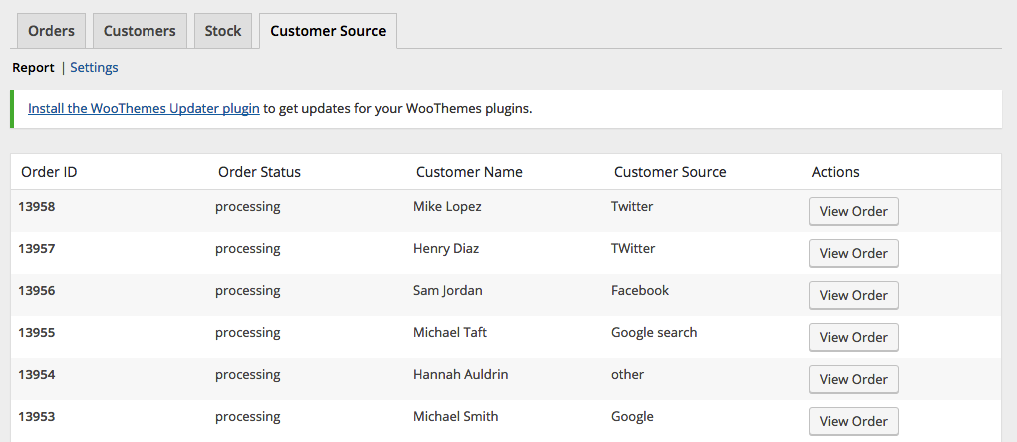
  • Report page.

  • Settings page.

Instalazioa

Install via the WordPress Dashboard:

  1. Login to your WordPress Dashboard.
  2. Navigate to Plugins, and select “Add New” to go to the “Add Plugins” page.
  3. In the right side, enter “Where Did You Hear About Us Checkout Field for WooCommerce” in the search input bar, and press Enter.
  4. Click install, and wait for the plugin to download. Once done, activate the plugin.

Install via FTP:

  1. Extract the zip file, login using your ftp client, and upload the storefront-site-logo folder to your /wp-content/plugins/ directory
  2. Login to your WordPress Dashboard.
  3. Go to “Plugins” and activate “Where Did You Hear About Us Checkout Field for WooCommerce” plugin.

MEG

Where can I find the report page?

You can find the report page by navigating to WooCommerce > Reports and click on the “Customer Source” tab.

Where can I find the settings?

You can find the settings page by navigating to WooCommerce > Reports and click on the “Customer Source” tab, and then click on the “Settings” link on the sub-navigation.

Berrikuspenak

Field meta name/key

vbosch 2025(e)ko apirilaren 16(a)
Hi there, Thanks for this plugin. We are using another plugin to automatically export and import orders into another system. In this plugin we have the capability to select certain ‘meta fields’, however we do not know what exact meta name / meta key your plugin uses. Could you please tell us? Thanks in advance

Just what we needed

windycitycabinet 2024(e)ko uztailaren 10(a)
A simple way to get feedback from you customer. Installed and running in 2 minutes.

A great little plugin! 🙂

kira7 2024(e)ko martxoaren 20(a)
No mess, no fuss, straight-forward plugin. Was up and running in around 10 minutes. It’s great that we can now ascertain how people found our site when going through the checkout process. Awesome stuff! 🙂

Does what it needs too

sasko2k 2024(e)ko otsailaren 2(a)
Great simple plugin, does exactly what it says, nothin more, no extra fluff. More plugins should be like this.

Great plugin, needs one small fix

gavie 2023(e)ko urriaren 24(a)
Great plugin, works fine. One suggestion: Currently the line “Other” is not translated in the dropdown-menu (only in the field label).. To fix: on wc-customer-source.php, line 589, please change the text-domain from woocommerce-admin to woocommerce, and it will work flawlessly.

Works great

fdittmar 2021(e)ko uztailaren 27(a)
Works fine. A little more in terms of formatting/design would be great (spacing / alignment on my pages isn’t great).
Irakurri 8 berrikuspenak

Laguntzaileak eta Garatzaileak

“Where Did You Hear About Us Checkout Field for WooCommerce” software librea da. Ondoko pertsonek egin dizkiote ekarpenak plugin honi.

Laguntzaileak
  • wooassist

Where Did You Hear About Us Checkout Field for WooCommerce 2 eskualde-ezarpenetara itzuli da. Eskerrik asko itzultzaileei beraien ekarpenengatik.

Itzul zaitez Where Did You Hear About Us Checkout Field for WooCommerce zure hizkuntzara.

Garapena interesatzen zaizu?

Araka kodea, begiratu SVN biltegia edo harpidetu garapen erregistrora RSS bidez.

Aldaketen loga

1.0.0

  • initial release

1.0.1

  • Logged Out user can now see the form
  • Tested with WordPress 4.9.2
  • Tested with Storefront 2.2.7
  • Tested with WooCommerce 3.2.6

1.1.0

  • Added Order Export Feature
  • Tested with WordPress 5.2.1
  • Tested with Storefront 2.5.0
  • Tested with WooCommerce 3.6.4

1.1.1

  • Updated code as suggested by @d9media

1.1.2

  • Updated code for tanslations

1.2.0

  • moved menu location due to deprecation of Reports section
  • updated codes for php8 compatibility

1.3.0

  • fixed php 8 compatibility
  • fixed export php notice

1.3.1

  • patched XSS Vulnerability

1.3.2

  • patched XSS Vulnerability (updated escaping code)

1.3.3

  • fixed translation issue of ‘Other’ field

Meta

  • Version 1.3.3
  • Azken eguneraketa duela urte 1
  • Instalazio aktiboak 1.000+
  • WordPress bertsioa 4.0.0 edo handiagoa
  • 6.6.4 (e)raino probatuta.
  • Hizkuntzak

    Danish, Dutch, eta English (US).

    Itzuli zure hizkuntzara

  • Etiketak
    brandingcustomcustomizerlogostorefront
  • Ikuspegi aurreratua

Balorazioak

4.6 out of 5 stars.
  • 6 5-star reviews 5 stars 6
  • 1 4-star review 4 stars 1
  • 1 3-star review 3 stars 1
  • 0 2-star reviews 2 stars 0
  • 0 1-star reviews 1 star 0

Gehi ezazu nire iritzia

See all reviews

Laguntzaileak

  • wooassist

Laguntza

Zerbait duzu esateko? Laguntza behar?

Ikusi laguntza foroa

  • Honi buruz
  • Albisteak
  • Ostatatzea
  • Pribatutasuna
  • Erakusleihoa
  • Itxurak
  • Pluginak
  • Ereduak
  • Ikasi
  • Laguntza
  • Garatzaileak
  • WordPress.tv ↗
  • Parte hartu
  • Events
  • Dohaintza egin ↗
  • Etorkizunari bostekoa
  • WordPress.com ↗
  • Matt ↗
  • bbPress ↗
  • BuddyPress ↗
WordPress.org
WordPress.org

Euskara

  • Visit our X (formerly Twitter) account
  • Visit our Bluesky account
  • Visit our Mastodon account
  • Visit our Threads account
  • Bisitatu gure Facebook orrialdea
  • Visit our Instagram account
  • Visit our LinkedIn account
  • Visit our TikTok account
  • Visit our YouTube channel
  • Visit our Tumblr account
Kodea Poesia da