

Deskripzioa
WordPress Multisite’s own Network Admin lets you see which plugins are network-activated, but it has no built-in way to see which plugins individual site admins have activated locally, one site at a time, across a whole network. Multisite Matrix closes that gap.
What it does
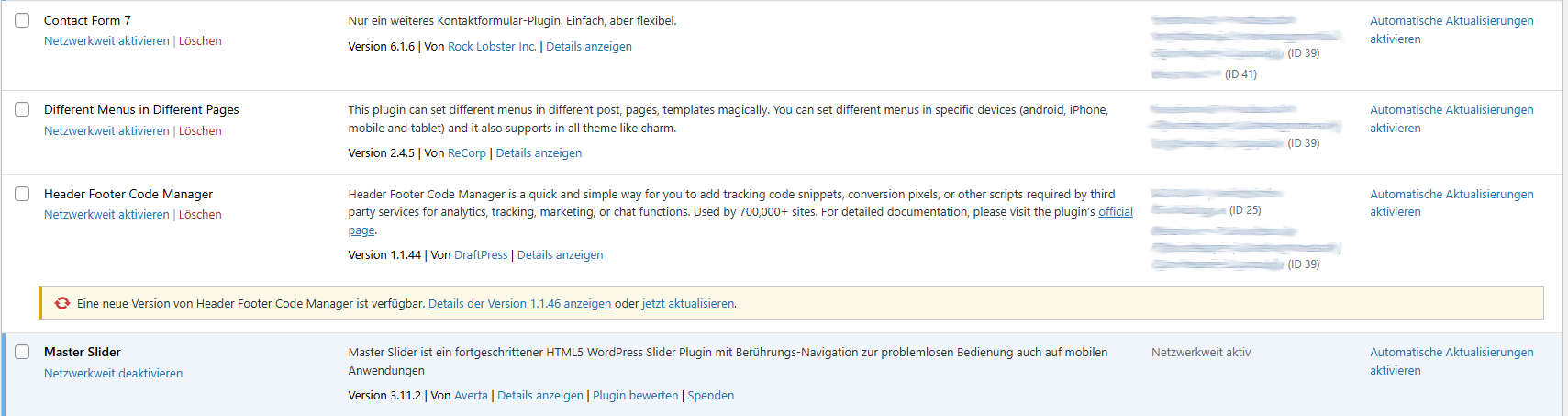
- Adds an “Active on Sites” column directly to the existing Network Admin > Plugins list, showing at a glance which sites have each plugin active locally.
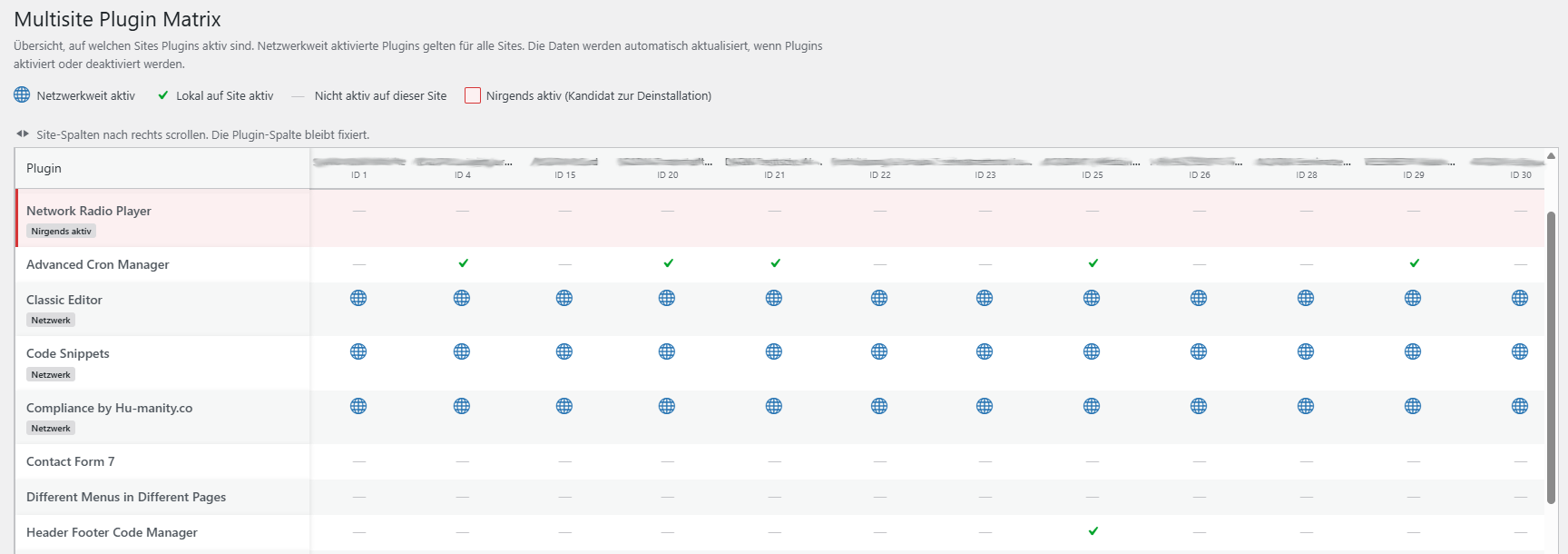
- Adds a dedicated Plugin Matrix page (Network Admin > Plugins > Multisite Matrix) with a full plugins-by-sites table: every installed plugin as a row, every site as a column, so you can scan the whole network’s plugin usage in one screen.
- Flags plugins that are installed but active nowhere in the network — a quick way to spot cleanup candidates before a security or performance audit.
- Distinguishes network-activated plugins (active for every site by definition) from plugins activated locally on individual sites.
- Links straight through to each site’s own Plugins screen from the matrix, so you can act on what you find without hunting for the right site first.
Why
On a network with more than a handful of sites, “which of our 40 sites still has that old SEO plugin turned on” is a real, recurring question that WordPress core simply doesn’t answer without opening every single site’s plugin screen by hand. Multisite Matrix answers it in one page load.
How it works
Data is read directly from WordPress’s own site and network options — nothing is sent anywhere, no external requests are made, and the plugin makes no changes to which plugins are active. The plugin-to-site mapping is cached for an hour (via a site transient) and automatically refreshed whenever a plugin is activated, deactivated, or a site is added or removed, so the matrix never depends on a manual rebuild.
Requirements
Multisite Matrix only does anything on a WordPress Multisite install — on a single-site install it stays completely inactive. It can only be network-activated (not activated on an individual site), and its screens are only visible to users with the manage_network_plugins capability (network administrators).
Pantaila-argazkiak
Instalazioa
- Upload the
multisite-matrixfolder to/wp-content/plugins/, or install it through the WordPress plugin screen directly. - Go to Network Admin > Plugins and network-activate Multisite Matrix. It cannot be activated on a single site — this is a Multisite-only plugin.
- Open Network Admin > Plugins > Multisite Matrix to see the full matrix, or just look at the new “Active on Sites” column on the regular Network Admin > Plugins screen.
MEG
-
Does this work on a normal (non-Multisite) WordPress install?
-
No. Multisite Matrix checks for a Multisite install on load and does nothing at all otherwise.
-
Can it activate or deactivate plugins for me?
-
No. It’s read-only by design — it shows you the current state across the network, but any activation, deactivation, or cleanup still happens the normal way, on the relevant site’s own Plugins screen (which the matrix links to directly).
-
Who can see the Plugin Matrix page?
-
Only network administrators (specifically, users with the
manage_network_pluginscapability). Regular site admins don’t see it. -
How current is the data?
-
The plugin-to-site map is cached for up to an hour, but it’s invalidated immediately whenever a plugin is activated or deactivated anywhere in the network, or a site is added or removed — so in practice it’s always accurate after any relevant change, not just once an hour.
-
Does it send any data anywhere?
-
No. Everything is read from your own WordPress database; the plugin makes no external requests.
Berrikuspenak
Ez dago berrikuspenik plugin honentzat.
Laguntzaileak eta Garatzaileak
“Multisite Matrix” software librea da. Ondoko pertsonek egin dizkiote ekarpenak plugin honi.
Laguntzaileak
Multisite Matrix 6 eskualde-ezarpenetara itzuli da. Eskerrik asko itzultzaileei beraien ekarpenengatik.
Itzul zaitez Multisite Matrix zure hizkuntzara.
Garapena interesatzen zaizu?
Araka kodea, begiratu SVN biltegia edo harpidetu garapen erregistrora RSS bidez.
Aldaketen loga
1.2.5
- Fixed the plugin header Description field, which was still German — now matches the English source strings used everywhere else.
1.2.4
- Source strings switched from German to English (WordPress.org convention) so the plugin can be properly localized.
- Added translations for German, French, Spanish, Italian, Dutch, Portuguese (Brazil), Polish, Russian, Japanese, and Chinese (Simplified).
1.2.3
- Renamed internal function, class, and option/transient names to use a unique “MULTMA”/”multma” prefix, per WordPress.org plugin review feedback.
1.2.2
- First public release on WordPress.org.