
Deskripzioa
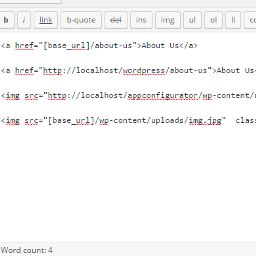
Now its easy to change domains and move your wordpress blog from subdomain to parent domain like from localhost to live domain you just need to use this shortcode [base_url] as your base url and images So now all links and images are fine after transfer site from localhost to live you don’t need to adjust links after change domain.
ShortCode
[base_url]
Pantaila-argazkiak

Instalazioa
** From your WordPress dashboard **
Visit ‘Plugins > Add New’ Search for ‘Relative URL ShortCode’ Activate ‘Relative URL ShortCode’ from your Plugins page.
** From WordPress.org **
Download ‘Relative URL ShortCode’. Upload the ‘Relative URL ShortCode’ directory to your ‘/wp-content/plugins/’ directory, using your favorite method (ftp, sftp, scp, etc…) Activate ‘Relative URL ShortCode’ from your Plugins page.
MEG
-
I need to change something after change domain?
-
No. we always use your site base url so you do not need any configuration for change domain.
-
I need to change any configuration after activate?
-
No. we always use your site base url so you do not need any configuration after activate.
Berrikuspenak


Laguntzaileak eta Garatzaileak
“Relative URL ShortCode” software librea da. Ondoko pertsonek egin dizkiote ekarpenak plugin honi.
Laguntzaileak
Itzul zaitez Relative URL ShortCode zure hizkuntzara.
Garapena interesatzen zaizu?
Araka kodea, begiratu SVN biltegia edo harpidetu garapen erregistrora RSS bidez.
Aldaketen loga
1.0
- it is a first version.